




Description
See your trend. Track your progress. Focus on the bigger picture.
A practical digital tracker designed to help you record weigh-ins,
understand your progress and keep perspective as your numbers change over time.

One weigh-in doesn’t tell the whole story.
Weight naturally moves up and down. The useful part is being able to see
where you started, where you are now and how your overall trend is moving.
It is easy to focus on one number.
A single weigh-in can change from one day to the next, making it difficult
to keep a clear perspective when you are only looking at today’s number.
Track the bigger trend.
Record your weigh-ins in one place and let the workbook keep your
current weight, total progress, remaining goal and percentage reached visible.
Everything you need to follow your progress.
The workbook keeps the process focused: set your starting point,
log your weigh-ins and use the Dashboard to understand your progress.
Set your starting point
Enter your Starting Weight, Goal Weight and today’s date on the Dashboard.
Log every weigh-in
Add the date and weight whenever you check in — daily or weekly, whatever you prefer.
See calculated progress
Keep Current Weight, Total Lost, Left to Goal and % of Goal Reached visible.
Keep perspective
Use the overall trend to understand progress instead of obsessing over one weigh-in.
What the Weight Loss Tracker actually looks like.
Explore the Dashboard, Weigh-In Log and built-in instructions so you can
see how the workbook is organized before you start using it.
Your progress, clearly laid out.
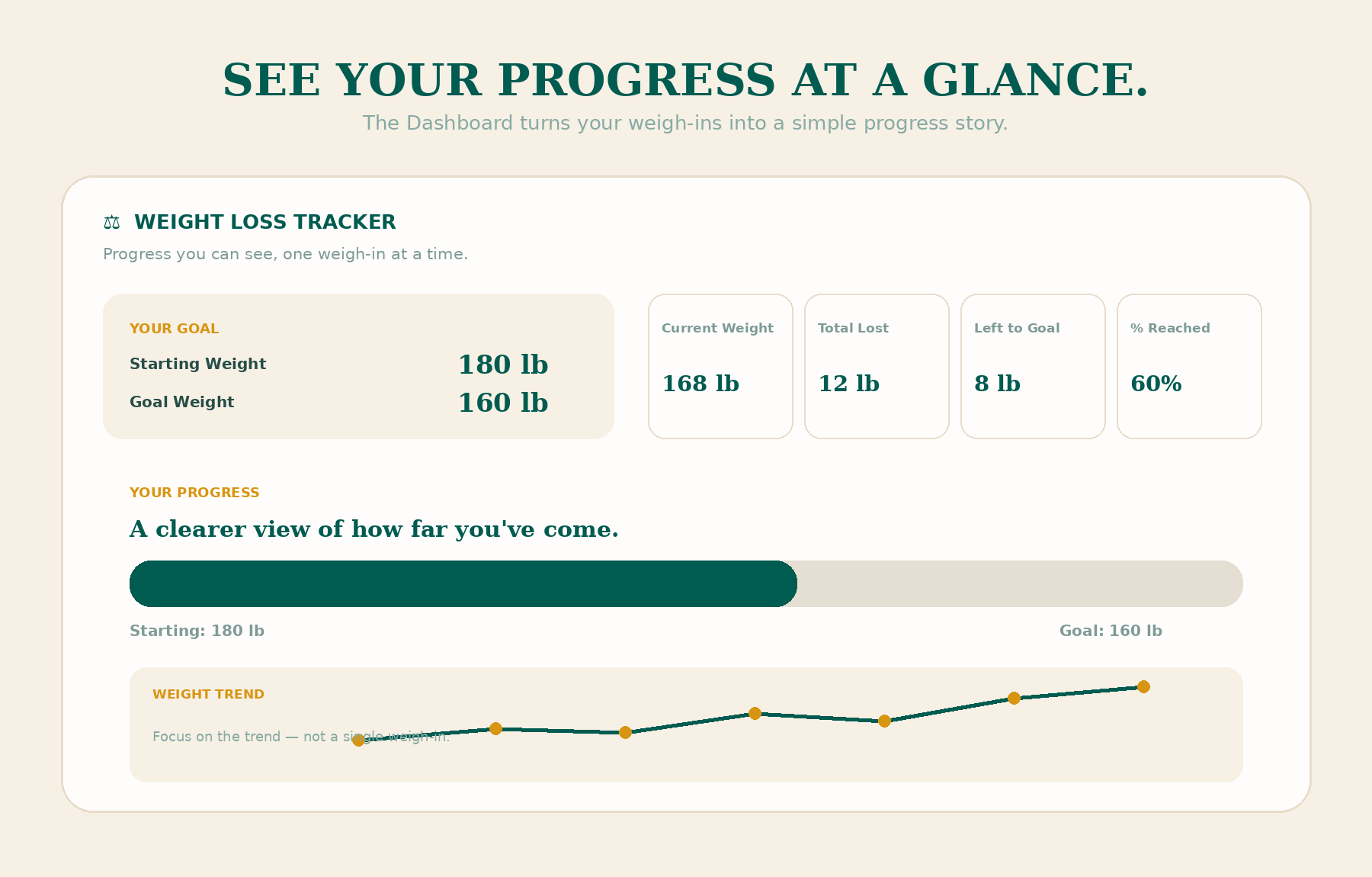
The Dashboard brings your starting point and current progress together.
See Starting Weight, Goal Weight, Current Weight, Total Lost,
Left to Goal and % of Goal Reached in one focused view.


Track the trend, not just the number.
Add each weigh-in with the date and weight. The workbook calculates
Change vs Last and Change vs Start, while the Note column gives you
space to record context around each entry.
Start simple. Stay consistent.
The workbook includes a dedicated How To Use sheet that walks you
through the three-step process: set your starting point, weigh in
regularly and watch your overall trend.

Know where you stand without doing the math yourself.
Enter your starting point and weigh-ins. The workbook uses those entries
to keep your key progress measures visible on the Dashboard.
Pulls the most recent weight from your Weigh-In Log.
Shows the difference between your starting and current weight.
Shows how much remains between your current and goal weight.
Shows your progress toward the gap between starting and goal weight.
A straightforward way to stay on top of your progress.
No complicated routine. Just set your starting point, add your weigh-ins
and return to the Dashboard when you want to review your progress.
Set your starting point
Enter Starting Weight, Goal Weight and today’s date in the Dashboard.
Weigh in regularly
Add a row to the Weigh-In Log each time you check — daily or weekly.
Watch your trend
Return to the Dashboard to see total progress and how much is left to your goal.
A focused workbook with three purposeful sheets.
Each sheet has a clear role, so the planner stays simple instead of becoming another
complicated system to manage.
Start here.
Follow the three-step setup and understand how to use the tracker with perspective.
See the bigger picture.
Review your starting point, current weight and key progress measures in one place.
Keep every check-in together.
Record dates, weights, changes and notes while the workbook calculates the key differences.
Use it in the way that works for you.
The How To Use sheet intentionally allows you to weigh in daily or weekly.
The goal is a clearer view of your longer-term trend, not pressure around a single entry.
Weekly weigh-ins
Starting-point tracking
Goal tracking
Progress review
Trend awareness
Weigh-in notes
Longer-term perspective
Weight naturally moves up and down.
That’s normal — not failure. Use the tracker to see the bigger trend
over weeks and months, rather than obsessing over any single weigh-in.
Good to know before you start.
A few practical answers about the workbook and how it is designed to be used.
What sheets are included?
The workbook contains three sheets: How To Use,
Dashboard and Weigh-In Log.
What do I enter?
Start with your Starting Weight, Goal Weight and date on the Dashboard.
Then add the date and weight for each weigh-in in the Weigh-In Log.
Does it calculate my progress?
Yes. The workbook calculates the most recent weight, Total Lost,
Left to Goal, % of Goal Reached, Change vs Last and Change vs Start
from your entries.
Can I weigh in daily or weekly?
Yes. The included instructions explicitly allow either daily or weekly
weigh-ins, depending on the routine you prefer.
Is this a physical product?
No. It is a digital spreadsheet product. No physical item is shipped.
Is it suitable for Excel and Google Sheets?
The product is presented as an Excel & Google Sheets digital tool,
making it suitable for a spreadsheet-based workflow.
Is this medical or professional health advice?
No. This planner is an organizational tracking tool. It is not intended
to diagnose, treat or replace advice from a qualified healthcare professional.
See the progress. Keep the perspective.
Bring your starting point, weigh-ins and progress into one calm,
practical digital tracker designed to help you focus on the bigger picture.
Haven Canvas Weight Loss Tracker is a digital organization and tracking tool.
It does not provide medical advice and should not be used as a substitute for professional healthcare guidance.
Reviews
There are no reviews yet.