Sale!

Debt Payoff Tracker

No reviews yet · Be the first to review
Instant access
📊Excel & Sheets
🔒Secure checkout
♻️Reusable digital tool

Original price was: $49.00.Current price is: $35.00.

Organize debts, payments and payoff strategies with Debt Snowball, Debt Avalanche and custom debt-order tracking.

Buy Now
Digital product · No physical item is shipped · Access and download details are provided after successful purchase.
Have a discount code?
Enter your coupon here and we’ll apply it to your cart.

Description

HAVEN CANVAS · DEBT PAYOFF TRACKER

Plan it. Track it. See your progress.

Bring your debts, payments and payoff progress into one organized digital workspace. Keep the numbers visible, follow a payoff strategy and make each payment count toward your plan.

Haven Canvas Debt Payoff Tracker dashboard
SEE YOUR PROGRESS

Know where you stand.

The dashboard gives you a focused view of your original debt, total paid off, remaining balance and overall percentage paid off.

EVERYTHING IN ONE PLACE

A clearer way to stay on top of your debt.

Organize your debts, follow your chosen payoff approach and keep your payment activity visible.

01

Organize Your Debts

Keep your debt names, balances, interest rates and minimum payments together in one workbook.

02

Choose Your Strategy

Use the Snowball or Avalanche approach described in the planner’s instructions.

03

Log Every Payment

Record payments in the payment log and keep your payoff activity organized.

04

Monitor Your Progress

Keep an eye on paid and remaining balances as you continue making payments.

TRACK IT ALL IN ONE PLACE

Keep every debt visible.

Add your debts with their key details, then use the payment log to record each payment as you work through your payoff plan.

Haven Canvas Debt Payoff Tracker debts and payment log
BUILT FOR PRACTICAL TRACKING

See what the workbook helps you manage.

Debt Details

Record the information needed to keep each debt organized, including its balance, interest rate and minimum payment.

Paid & Remaining

Follow how much has been paid and how much remains as you record your payments.

Priority & Status

Use the workbook’s priority and status information to keep active debts organized.

Payment History

Keep a running record of your payments so your payoff activity stays easy to review.

SIMPLE TO FOLLOW

A clear three-step routine.

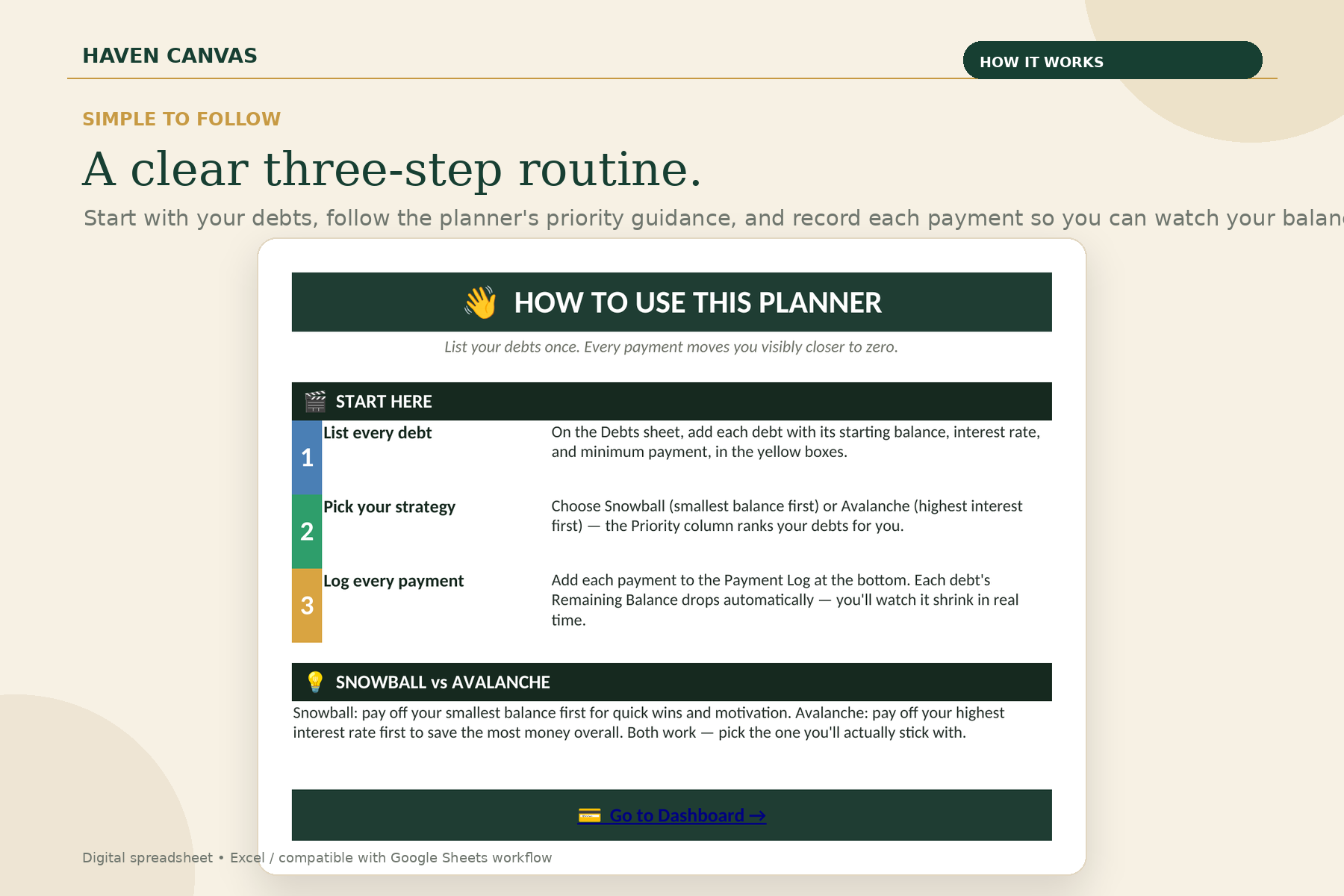
Start with your debts, choose your payoff approach, then keep recording payments so your progress stays visible.

Haven Canvas Debt Payoff Tracker how to use instructions

Start simple. Stay consistent.

A straightforward workflow keeps the focus on your debts and your progress.

1

List Your Debts

Add each debt with its starting balance, interest rate and minimum payment.

2

Pick Your Strategy

Use Snowball or Avalanche as your chosen approach and follow the planner’s priority guidance.

3

Log Every Payment

Record each payment and watch your paid and remaining balances change.

CHOOSE YOUR APPROACH

Snowball or Avalanche?

The planner explains both popular payoff approaches so you can choose the method that fits your priorities and motivation.

DEBT SNOWBALL

Start with the smallest balance.

Focus on the smallest debt first for quick wins and visible momentum.

DEBT AVALANCHE

Start with the highest interest rate.

Focus on the highest-interest debt first with the goal of reducing costly interest over time.

MADE FOR REAL-LIFE FINANCIAL ORGANIZATION

Useful when you have more than one balance to manage.

Credit card debt
Student loans
Car loans
Personal loans
Multiple debts
Anyone building a payoff routine
QUESTIONS?

Good to know before you buy.

What is included?

The workbook includes a How To Use guide, a Debts & Payment Log and a Debt Payoff Tracker dashboard.

Can I track multiple debts?

Yes. The workbook provides a dedicated debt table for organizing multiple debt entries.

Does it include Snowball and Avalanche?

Yes. The included How To Use section explains both Debt Snowball and Debt Avalanche approaches and describes how the Priority column can be used.

Can I record my payments?

Yes. Use the Payment Log to record each payment and keep your payoff activity organized.

Is this financial advice?

No. This is an organizational and tracking spreadsheet designed to help you manage your debt information. It is not professional financial, legal or investment advice.

HAVEN CANVAS

A clearer payoff starts with a clearer plan.

Organize your debts, choose your approach, record your payments and keep your progress visible in one practical digital planner.
Reviews

There are no reviews yet.

Be the first to review “Debt Payoff Tracker”

Your email address will not be published. Required fields are marked *

Turn your debt into a plan

Stop staring at the balance. Start seeing the path forward.

Organize debts, payments and payoff strategies in one structured tracker.

A practical debt-tracking workspace.

  • Debt overview
  • Debt Snowball method
  • Debt Avalanche method
  • Custom debt order
  • Payment tracking
  • Progress monitoring

The problem

Multiple balances, payment dates and strategies can make debt feel harder to organize than it needs to be.

The simpler way

Bring your debts into one structured view and compare different payoff approaches so you can follow a plan that fits your priorities.

Why choose Haven Canvas

01 · ClaritySee the information that matters without unnecessary clutter.
02 · FlexibilityAdapt the planner around your own priorities and routines.
03 · ConfidenceKnow what is planned, pending or worth reviewing.
04 · ReusabilityKeep your digital system, update it and revisit it over time.
Haven CanvasYour debt doesn’t have to feel like a maze.
Perfect for

Built around real planning needs.

Tracking multiple debts
Snowball planning
Avalanche planning
Payment organization
Monitoring payoff progress
Product FAQ

Good to know before you buy.

Which payoff methods are included?+

The tracker includes Debt Snowball, Debt Avalanche and a custom debt-order option.

Does it guarantee debt-free results?+

No. It is a tracking and planning tool and does not guarantee a particular payoff date or financial outcome.

Can I track payments?+

Yes. Payment tracking and progress monitoring are part of the planner structure.

Customer feedback

Your experience can be next

We will show genuine customer reviews here as they are received. No invented ratings or testimonials.

Real reviews will appear here.

Once customers leave approved WooCommerce reviews, this section will automatically display them.

SimpleDesigned for everyday use
PracticalBuilt around real planning needs
ReusableEdit and revisit your digital tools
SecureCheckout through WooCommerce
FAQ

Your Questions, Answered

Helpful information before you choose a digital planner.

How will I receive my planner?+

For eligible digital products, access and download instructions are provided after successful payment.

Is it Excel or Google Sheets?+

The supported format is stated on the individual product listing.

Can I use it on Mac or mobile?+

Compatibility depends on the file format and software you use. Check the individual product listing for the supported setup.

Can I customize it?+

Most Haven Canvas planners include editable sections. The exact customization features are described on each product page.

What happens after payment?+

After successful payment, WooCommerce provides the digital delivery/access information configured for the product.

What payment methods are available?+

Available payment methods are shown securely at checkout. PayPal can be added once the WooCommerce PayPal gateway is configured.

What is the refund policy?+

Please review the store’s published refund policy before purchasing, particularly because digital products may have different refund terms.

Start planning beautifully

Choose a planner that makes life feel simpler.

Explore the Haven Canvas collection and find a practical digital tool built around what you actually want to organize.

Explore all planners →